
Manage methodology access, so that your users can have access to the content they need.
Applies to: Plus plans | Access Needed: Manage Users admin permissions
Instructions
View Current License Usage
You can view your current license scope and usage at any time via the Access tab within Team Management. The tab also lists the email addresses of all users that have permissions to authorize purchases (users that have the Buy More action available to them).
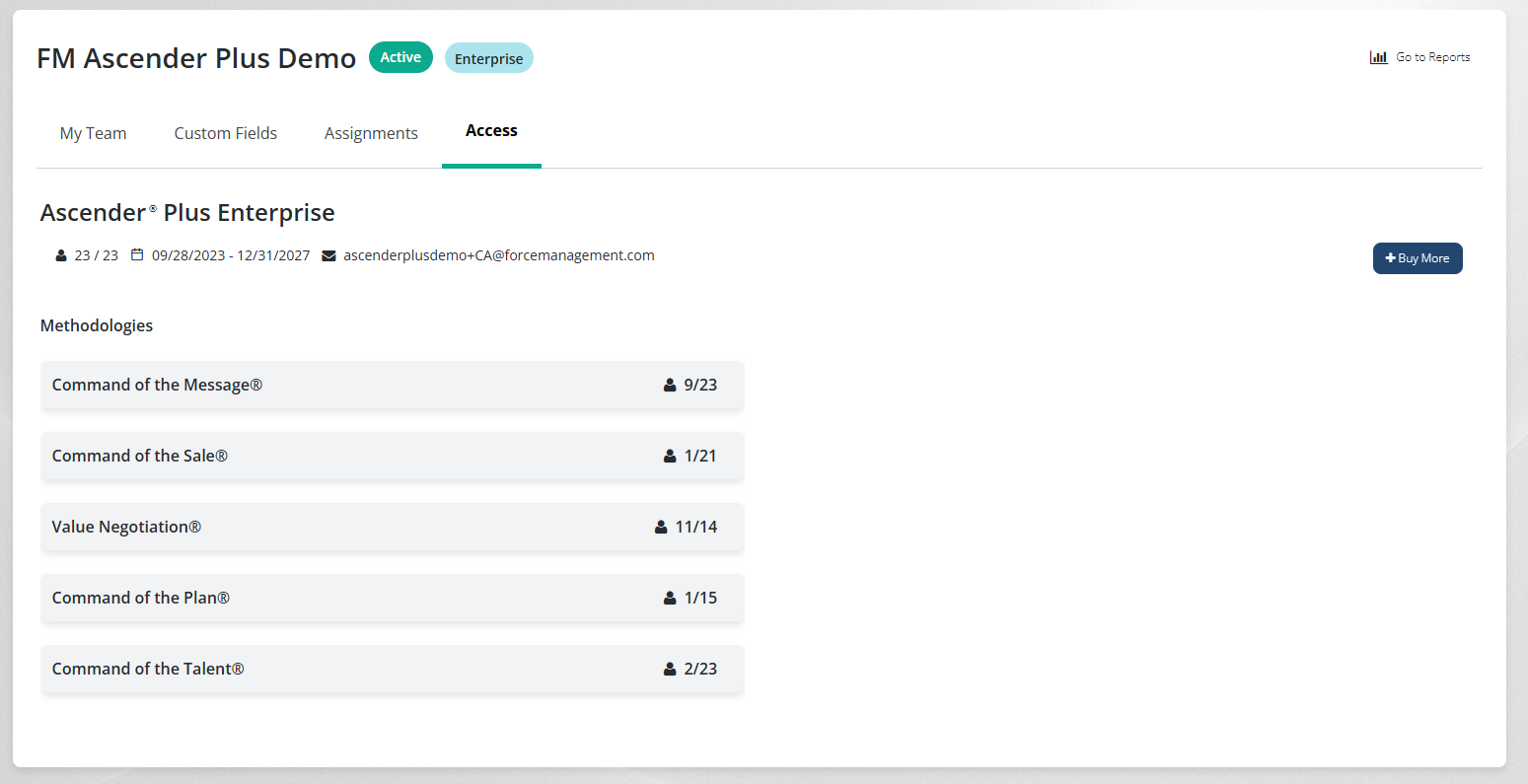
Allocate a Methodology License to a User
We recommend only adding a methodology license using this method if the user has already attended manager coaching or training for that methodology. For upcoming manager coaching or training participants, they’ll be automatically granted the license when you assign them the pre-work.
via 
-
In the user table, find the user(s) you need to allocate methodology access to.
-
Select the user’s Name.
-
In the Methodology Access dropdown, select the methodology you want to allocate to them.
-
Select Save.
This will allocate methodology access, and that user will now have access to catalog content for that methodology.
Remove a Methodology License from a User
If that user did not/will not attend training for a specific methodology and they didn't access any of that methodology's content in Ascender, then you can remove that methodology license from them to make it available to reallocate.
via
-
In the user table, find the user(s) you need to remove methodology access from.
-
Select the user’s Name.
-
Select the Methodology Access dropdown, then uncheck any unlocked methodologies you want to remove.
-
Select Save.
A lock icon next to the methodology indicates that it has already been consumed by the user and cannot be removed. Only unconsumed methodologies can be removed and reallocated.
This will remove the methodology access, and that user will no longer have access to catalog content for that methodology. If they have been assigned any content for that methodology, they will receive an error message stating that they no longer have access if they attempt to launch that content.
Additional Information
-
Once a user starts any of the courses for a methodology, that license will be consumed and you will not be able to remove it to reallocate to someone else later on.
-
If a user attended a training for a methodology (including manager coaching), that is also considered consuming a license and the license should not be removed from that user.
-
You do not need to allocate methodology licenses to users that are only participating in an EA Call or it's prework. If you do allocate licenses to them, and they consume methodology content, that license will get locked in and unable to be reallocated.
Related Articles
-
Invite Users to Your Company -
Invite Users to Your Company via File Upload -
Resend Invitations -
Update a User's Information via Edit User -
Update Users' Information via Actions -
Update Users' Information via File Upload -
Manage Methodology Access -
Deactivate Users -
Reactivate Users -
Export User List -
Troubleshoot Team Management: My Team (Users)