
Resend invitations to your users in Waiting status so that they will be reminded to log in, complete their onboarding, and set up their account.
Applies to: Plus plans | Access Needed: Mange Users admin permissions
Instructions
Automatic Invitation Resends
Ascender automatically resends an invitation email every Saturday to any users that have been in a Waiting status for more than 6 days. Admins can also resend these invitations on a one-off basis as needed, following the instructions below.
Resend Invitations
via 
-
Select the checkbox for each of the users you need to resend an invitation to.
-
Tip: Filter User Status by Waiting.
-
-
Selection Actions then Resend Invite.
-
Select Continue on the confirmation popup.
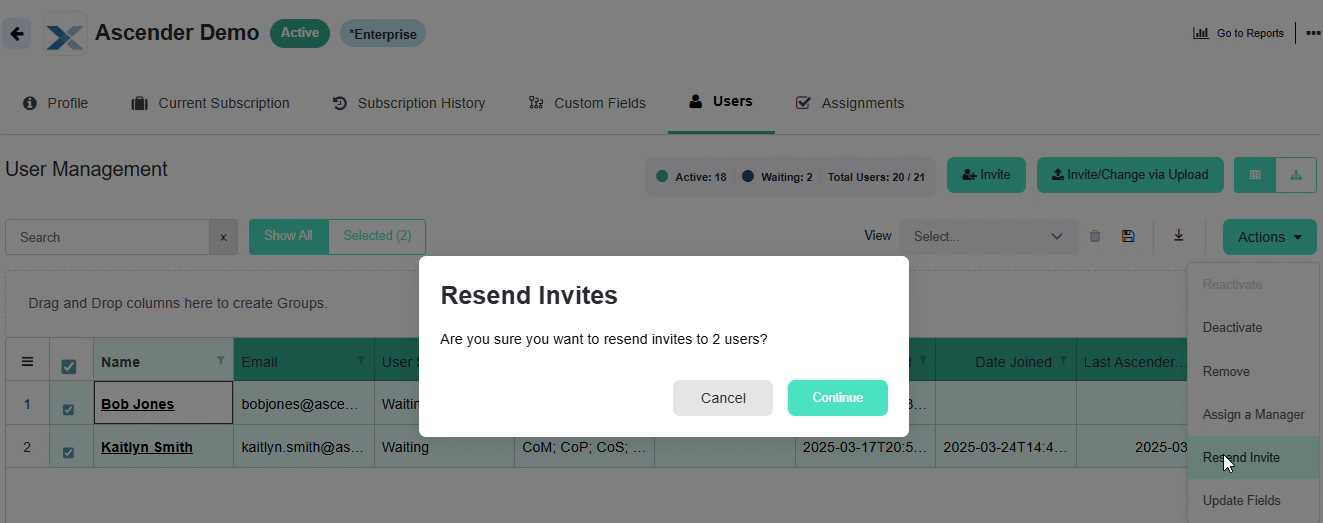
This will send a new Welcome to Ascender email to the selected users with instructions on how to set up their account.
Related Articles
-
Invite Users to Your Company -
Invite Users to Your Company via File Upload -
Resend Invitations -
Update a User's Information via Edit User -
Update Users' Information via Actions -
Update Users' Information via File Upload -
Manage Methodology Access -
Deactivate Users -
Reactivate Users -
Export User List -
Troubleshoot Team Management: My Team (Users)