Integrating Force Management Methodologies into Salesforce: A Comprehensive Admin Reference Guide
A turnkey solution for integrating Force Management methodologies into Salesforce ADMIN REFERENCE GUIDE
Recommendations
-
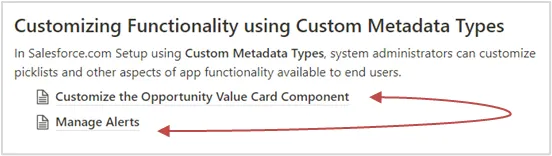
Follow the Installation and Administration Guide during the entire installation and set-up process. The guide allows you to click on certain topics for step-by-step instructions on managing each component within the app. For example, you’ll see two links within the image below. Clicking on those links will open a page instructing you on how to complete the listed actions.
-
Did you discover that your company is running tight on space within Salesforce during your install? We recommend adjusting the rich text field limits from the default of 131,072 down to 32,000 in order to free up extra space.
-
Once reps begin using Opportunity Manager®, regularly review what they have written in the "other" fields within the “Value Drivers,” “Proof Points, ”and “Competitors” sections. If you notice any common themes, consider updating your company’s metadata to include those themes.
-
Consider leveraging the "Budget Identified" field into a custom report in order to get an idea of the Most Likely/Forecast deals for the quarter.
-
Utilize the pre-built Opportunity Manager dashboard for quick insight into the rep’s adoption of the app. Bring signs of low adoption to leadership so they’re able to adjust their approach.
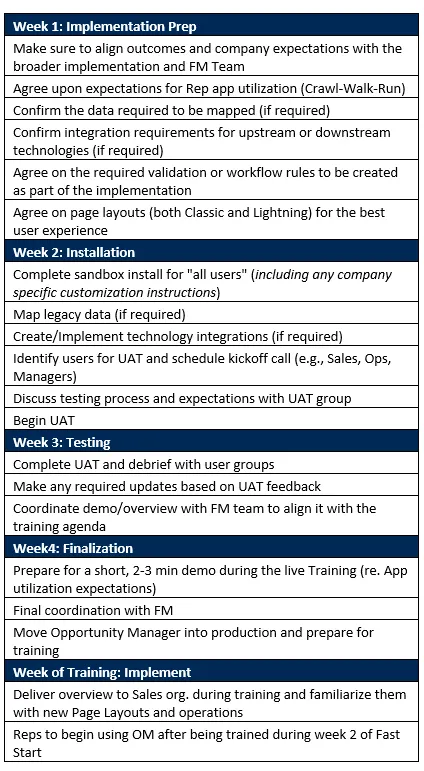
Suggested Implementation Calendar