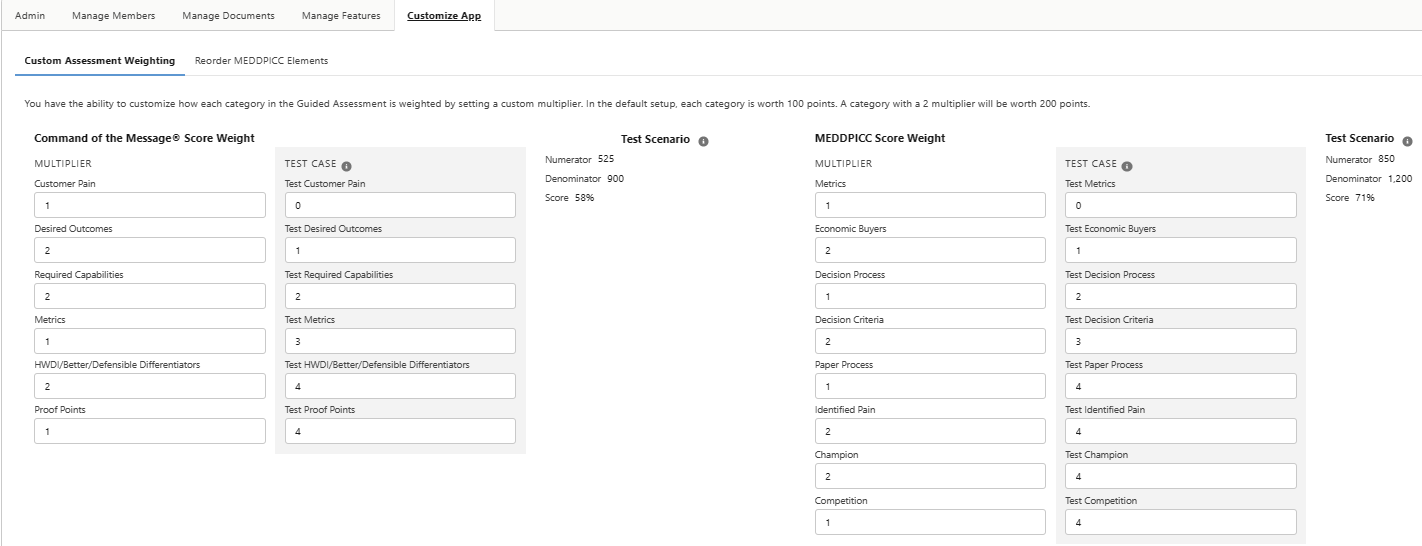
Admins are now able to arrange the order of the MEDDPICC fields within the MEDDPICC Qualifier and change the weighting of the Guided Assessment scores for both methodologies.
Customize MEDDPICC Field Order
From the Opportunity Manager Configuration Tab:
-
Click on “Customize App”
-
Click “Reorder MEDDPICC Elements”
-
Drag and drop the MEDDPICC elements to your desired new order
-
Click “Save”
Adjust Assessment Score Weighting
From the Opportunity Manager Configuration Tab:
-
Click on “Customize App”
-
View the assessment weighting “Multiplier” and “Test Case”
-
The “Multiplier” is what controls the weight
-
The “Test Case” is for testing how the weight will affect the end-result score
-
0 = no confidence | 1= slightly confident | 2 = moderately confident | 3 = very confident | 4 = extremely confident
-
-
When changing the “Test Case” numbers, you will see the score within the test scenario change.
-