
Force Management recommends the following setup in order to maximize your implementation of the Opportunity Manager®. Keep in mind that this is just a recommendation and you may decide to implement these components in a different manner if it better supports your current selling motion.
Opportunity Value Card & MEDDPICC Qualifier
We recommend creating a new tab on the main page region for placing both the Opportunity Value Card and MEDDPICC Qualifier components. To create a new tab, follow these instructions:
-
From any Opportunity Page, navigate to the gear icon in the upper right-hand corner and click Edit Page. You will then be taken to the Opportunity Record Page editor.
-
Next, click on the Tabs component typically located in region 2 in the graphic above.
-
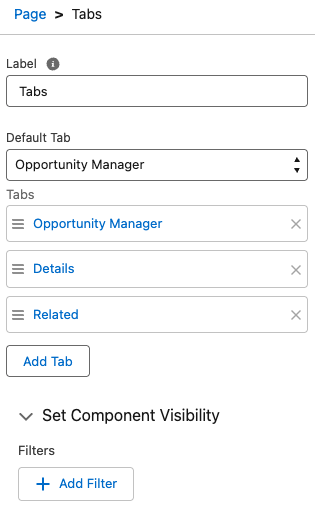
Once you’ve done this, you should see the following options (or something similar) located on the right-hand side of the window.
-
Click on the Add Tab button. This will allow you to create a new tab which will be visible on the Opportunity Record page. By default, the new tab will be added to the end of the list of current tabs. The name of this new tab will be dependent on what your Default tab is set to.
-
In order to rename this tab, left-click on the tab name. You will be provided with a drop-down menu to select a tab name from. Click the arrows to select from the list. At the top of the list, you should see an option for Custom. Select this, and then in the Custom Label textbox enter Opportunity Manager. Then select Done. You should now see the new tab listed under the Tabs section labeled Opportunity Manager.
-
You can reposition the Opportunity Manager tab among the existing tabs by clicking on the button and dragging the tab up or down.
📋 Related Articles